
Scenario Analysis for Better Risk Planning
- Jennifer
- Jan 6, 2025
- 3 min read
Introduction
In today’s complex and uncertain business environment, effective risk management is no longer optional but a necessity. Scenario analysis has emerged as a powerful tool in this domain, enabling organizations to anticipate potential risks and develop robust mitigation strategies. This article will explore the concept of scenario analysis, its importance in risk planning, and practical steps to conduct one effectively using a tool like Microsoft Excel.

What is Scenario Analysis?
Scenario analysis is a strategic planning method used to predict and prepare for possible future events by examining the outcomes of various hypothetical scenarios. It helps organizations assess the impact of potential risks, uncertainties, and external shocks on their operations, finances, or projects. Unlike static risk assessments, scenario analysis provides dynamic insights by modelling different “what-if” situations.

Why is Scenario Analysis Important?
Enhanced Decision-Making: It equips decision-makers with data-driven insights to make informed choices.
Risk Mitigation: By identifying potential vulnerabilities, organizations can implement proactive measures.
Strategic Flexibility: Enables businesses to adapt quickly to changing environments.
Improved Resilience: Helps in building a culture of preparedness and resilience.
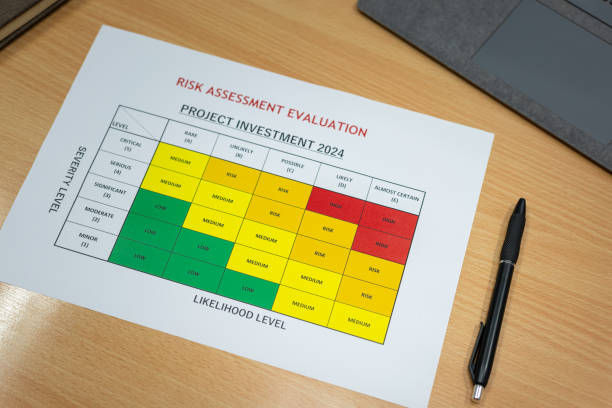
A visual of a risk planning matrix Practical Application: Case Study on Supply Chain Risk
Company Overview: A mid-sized manufacturing firm heavily reliant on a global supply chain.
Scenario: The company anticipates potential disruptions in raw material supply due to geopolitical tensions and rising transportation costs.

Steps Taken:
Scenario Identification:
Optimistic Scenario: The supply chain functions smoothly with minimal cost increases.
Moderate Scenario: Moderate delays and a 10% rise in transportation costs.
Pessimistic Scenario: Severe disruptions lead to a 30% increase in costs and delayed shipments by three weeks.
Data Gathering:
Historical transportation costs and lead times.
Current geopolitical reports.
Supplier reliability ratings.
Model Development:
Created an Excel model with variables for cost, lead time, and inventory levels.
Applied formulas to calculate the financial and operational impact under each scenario.
Simulation:
Used Excel’s “Data Table” function to simulate outcomes under different scenarios.
Action Plan:
Optimistic Scenario: Maintain current operations.
Moderate Scenario: Negotiate flexible contracts with suppliers.
Pessimistic Scenario: Identify alternative suppliers and increase safety stock.

A Simple Chart Illustrating Scenario Impacts
Conducting Scenario Analysis Using Excel
Here is a step-by-step guide to performing scenario analysis:
Step 1: Define Variables
Identify key variables that could affect outcomes (e.g., costs, demand, lead times).
In this case, we would be using this data as an example:

A table with scenarios as rows and metrics as columns Step 2: Create a Base Model
Develop a base financial or operational model in Excel with inputs, outputs, and calculations.
Step 3: Add Scenarios
Use Excel’s Scenario Manager (Data → What-If Analysis → Scenario Manager):
Click “Add” to define scenarios.
Enter values for key variables under each scenario.
Save scenarios for comparison.

Data Tab - the Forecast group - What-If Analysis and select Scenario Manager.
Step 4: Analyze Results
Generate a summary report to compare outcomes across scenarios. This will highlight potential risks and opportunities.
Step 5: Interpret and Act
Use insights to:
Develop mitigation strategies.
Communicate findings to stakeholders.
Monitor and update scenarios as new information emerges.
Practical Tips for Effective Scenario Analysis
Collaborate: Involve cross-functional teams with diverse perspectives.
Stay Updated: Use real-time data for accuracy.
Prioritize Scenarios: Focus on the most probable and impactful scenarios.
Leverage Tools: Advanced tools like Power BI or Python can handle more complex scenarios.
Iterate: Continuously update models as new risks and data emerge.
Conclusion
Scenario analysis is not just a risk management tool but a strategic enabler for organizations. By simulating potential risks, businesses can prepare for uncertainties, mitigate vulnerabilities, and enhance resilience. Leveraging tools like Excel makes scenario analysis accessible and actionable for organizations of all sizes. Start integrating scenario analysis into your risk planning today to navigate the future with confidence.


Comments